1. Quick start
DX Hunter is deliberately easy to begin: choose where you are, choose a band and mode, press Start, then catch signals on the panadapter before they fade. The complexity comes from deciding which signals are worth the risk.
- Set your station location (QTH). Enter a Maidenhead locator or coordinates. QTH affects distance, scoring and greyline calculations.
- Choose a band. Start with 20m for a balanced introduction, or 40m for more lower-band/regional flavour.
- Choose a mode. DX Hunter is a good first purposeful game; Free Play is useful if you simply want to learn without a time limit.
- Leave Conditions on Live for normal play, or choose an override to experiment with a particular propagation mood.
- Press Start. The button changes to On Air and signals begin to appear.
- Scroll to the panadapter on a phone. Click/tap signal peaks there. The map markers are context only.
- Watch the labels. Wrong-band signals, pile-ups, split operation, ghosts, region-only callers and special events all change what a sensible click looks like.
2. What is on screen?
The desktop editions show the whole operating desk at once. On smaller screens the layout stacks vertically, so the panadapter may be lower down the page.
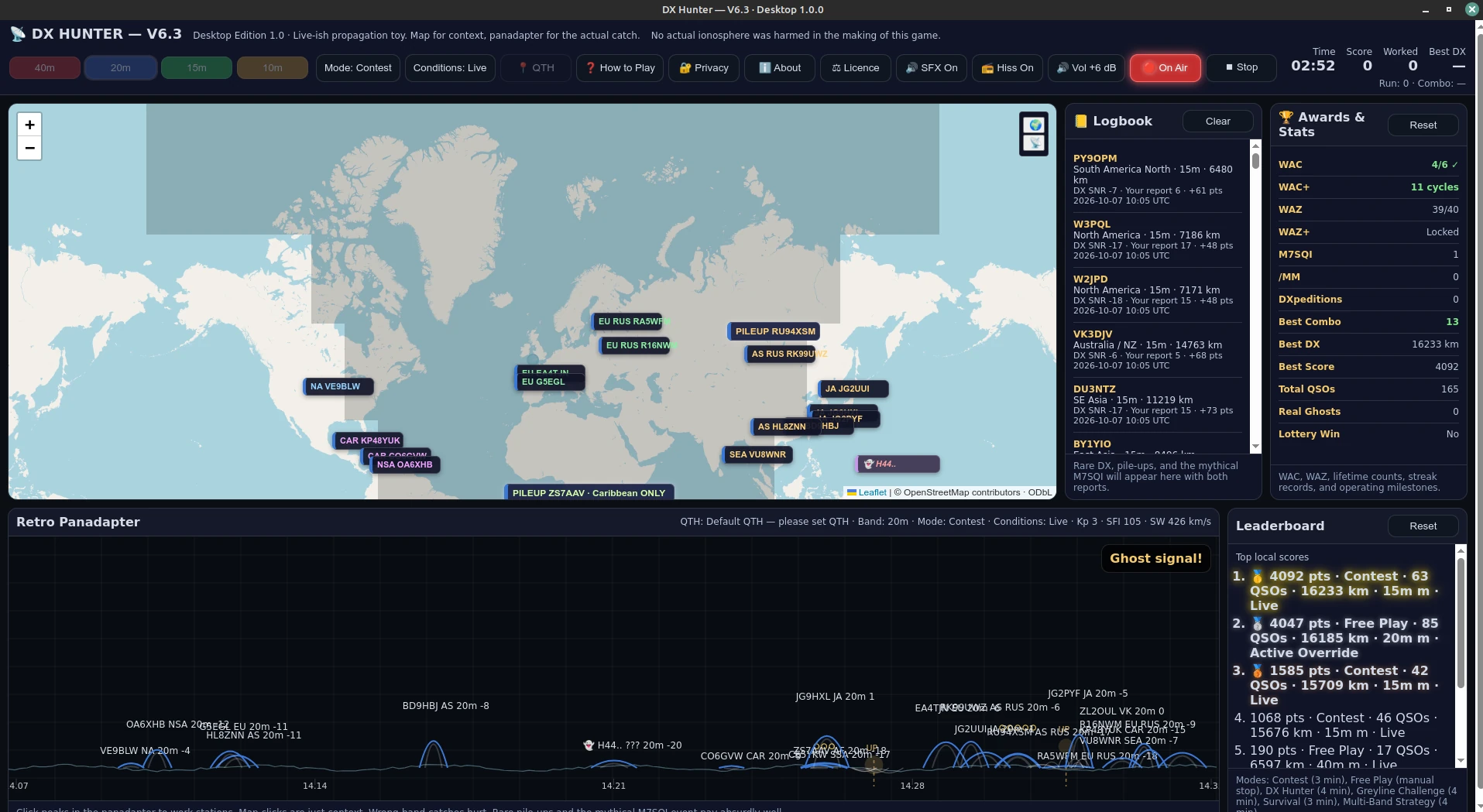
Top controls
Band buttons, Mode, Conditions, QTH, How to Play, Privacy/About/Licence, audio controls, Start and Stop.
Run statistics
Time remaining, current score, number worked, best DX for the run, plus combo and run statistics.
Map
Shows your QTH and geographic context for incoming stations and paths. Useful for distance and greyline geography, but not the operating surface.
Logbook & Awards
Successful contacts are logged locally. Lifetime achievements and statistics accumulate as you play.
Retro Panadapter
The actual game area. Signals appear as peaks with callsign/band/SNR information. Tap or click peaks to attempt the contact.
Leaderboard
Keeps the top local scores on your device, including mode, QSOs, best DX, band and conditions.
3. Set your QTH
Your QTH is your station location. DX Hunter uses it for distance, propagation flavour, greyline calculations and scoring, so setting it reasonably accurately makes the game feel more personal.
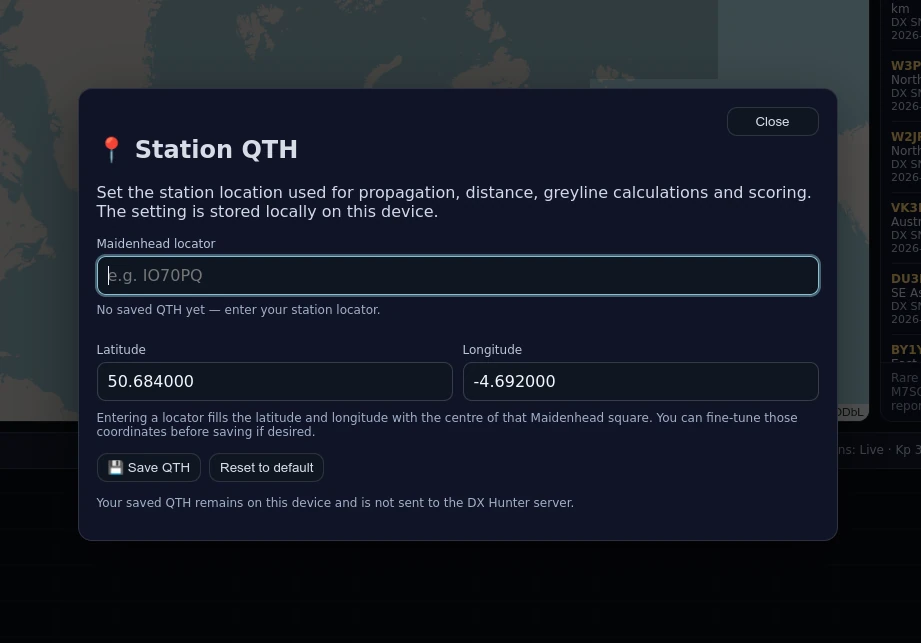
Standalone editions
Use the 📍 QTH control. You can enter a 4, 6 or 8 character Maidenhead locator, or exact latitude/longitude. Entering a locator fills the coordinates with the centre of that locator square; you can fine-tune the coordinates before saving.
Browser edition
The browser version may use browser geolocation and, if that is unavailable or denied, an approximate IP-based location fallback. The standalone editions use the QTH you choose.
4. Core gameplay
The basic goal is to work as much useful DX as possible within the selected mode. Signals are temporary. Strong ones may be obvious and forgiving; weak or fading ones reward better timing and can disappear before you decide whether to risk the click.
A normal contact
A normal station usually needs one accurate click/tap on its panadapter signal. A successful contact is scored, added to the logbook and contributes to lifetime statistics.
Signal strength
Each visible signal carries an SNR-style value. More-negative figures represent weaker signals. Weak signals are harder to work but can earn additional points.
Combos
Consecutive successful catches within the mode's combo window build a streak. The first four catches do not earn a combo reward; the bonus starts at five in a row.
5. Choosing a band
DX Hunter offers four HF bands. They have different propagation personalities rather than merely changing the colour of the display.
| Band | General character | Useful way to think about it |
|---|---|---|
| 40m | Lower-band workhorse; stronger local/regional flavour. | Reliable lower-band operating, with night-side long-haul opportunities. |
| 20m | Balanced DX option with broad usefulness. | A good first band when you want a mixture of activity and useful distance. |
| 15m | High-band DX becomes more attractive when propagation is active. | Rewarding in good conditions; less dependable when things are quiet or disturbed. |
| 10m | Feast or famine. | Can be wonderfully productive when open and conspicuously unhelpful when it is not. |
6. Conditions
The Conditions control changes the propagation mood used by the game engine. This is a game-friendly propagation model, not a replacement for serious real-world prediction tools.

| Setting | What it does |
|---|---|
| Live | Uses current solar/propagation information and reduces it to a simplified game mood. |
| Quiet Override | Fewer signals overall, stronger lower-band bias and reduced high-band activity. |
| Active Override | A healthier active-band feel with stronger high-band opportunity. |
| Storm Override | More instability, weaker/faster-fading signals and suppressed high-band performance. |
| Solar Maximum | Favours lively 15m/10m conditions and longer-lived high-band opportunity. |
| Night-side Bias | Strongly favours lower-band and dark-path behaviour, particularly 40m. |
| Contest Conditions | Higher activity and pile-up flavour, intended to make the bands feel busier. |
7. Game modes
Contest · 3 minutes
The frantic mode. Signals arrive quickly and the panadapter can become crowded. It is deliberately busy and may feel especially cramped on a phone.
Free Play · no fixed timer
Runs until you press Stop. Useful for learning the interface, experimenting with conditions, watching propagation behaviour or simply operating without a clock hanging over you.
DX Hunter · 4 minutes
Fewer, rarer and more valuable stations. Region rarity has extra influence and DXpeditions are more likely than in most other modes.
Greyline Challenge · 4 minutes
Focuses on paths favoured by the dawn/dusk terminator. Stations can be marked GL or GL★.
Survival · 3 minutes
Your score continuously decays, so you have to keep working stations to stay ahead.
Multi-Band Strategy · 4 minutes
Band choice matters much more, wrong-band traps are more common, and you can change band while the run is active.
8. Signals, labels and special events
| What you see | What it means |
|---|---|
| Normal callsign | Ordinary station. Usually one accurate panadapter click is enough. |
| GL | A greyline-favoured path in Greyline Challenge. |
| GL★ | A stronger greyline opportunity. |
| DXP | DXpedition / rare-location event. Harder and more valuable. |
| 🌊 /MM | Maritime mobile station at sea. |
| 👻 ??? | Ghost trace. Usually false and costly; occasionally genuine and rewarding. |
| Wrong band | A deliberate trap. The label may show a band other than the one you are currently operating. |
| “X ONLY” | A pile-up requesting a particular region. |
| 🚨 M7SQI | Ultra-rare special event. |
9. Pile-ups and split operation
A pile-up is deliberately different from a normal station. You are competing with the imaginary crowd, so one click may not be enough.
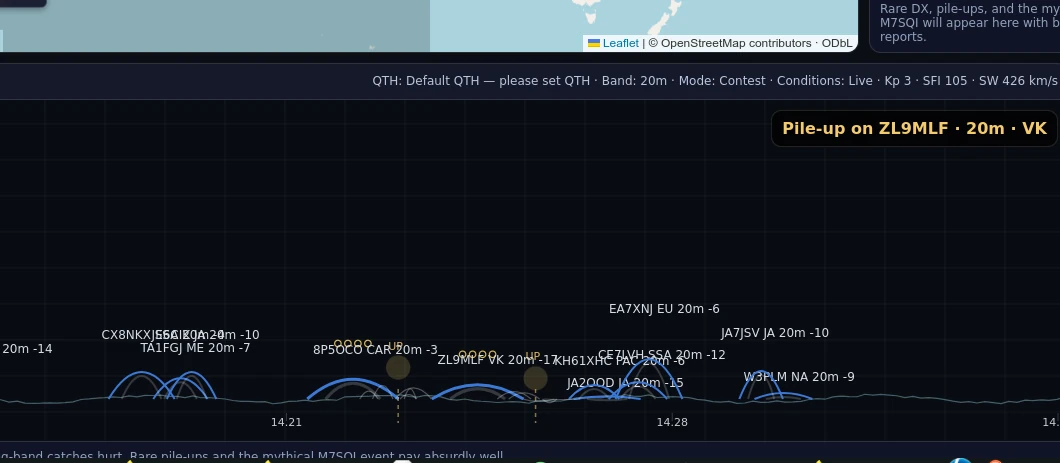
Ordinary pile-up
Repeated accurate clicks gradually break through. The required number of hits varies.
Split pile-up — “UP”
Some DX stations transmit on one frequency but listen higher. In a split pile-up, do not keep clicking the DX station's own peak. Work the offset response area instead.
10. Scoring
Each successful catch begins with a base score, then gains bonuses for distance and weak signals. That subtotal is multiplied by rarity, after which special bonuses or penalties are applied.
Score = round((10 + distance bonus + weak-signal bonus) × rarity)Weak-signal bonus
| SNR | Bonus |
|---|---|
| ≤ −20 | +24 |
| −19 to −15 | +16 |
| −14 to −10 | +10 |
| −9 to −5 | +5 |
| −4 or stronger | +0 |
Special bonuses
| Event | Reward |
|---|---|
| Pile-up | +40, plus +10 for each required hit |
| DXpedition | Final score ×2.4 |
| 🌊 /MM | +12 |
| 🚨 M7SQI | +220, after its unusually high rarity weighting |
| Greyline Challenge | +10 or +22 for favoured greyline paths |
| Multi-Band Strategy | Final score ×1.25 |
11. Logbook and leaderboard
Successful contacts are added to the local logbook. The game also stores the top local scores, including mode, QSOs, best DX, band and conditions.
12. Awards and lifetime statistics
Awards are persistent local progress rather than one-run achievements. The panel mixes recognised amateur-radio ideas with deliberately game-like milestones.
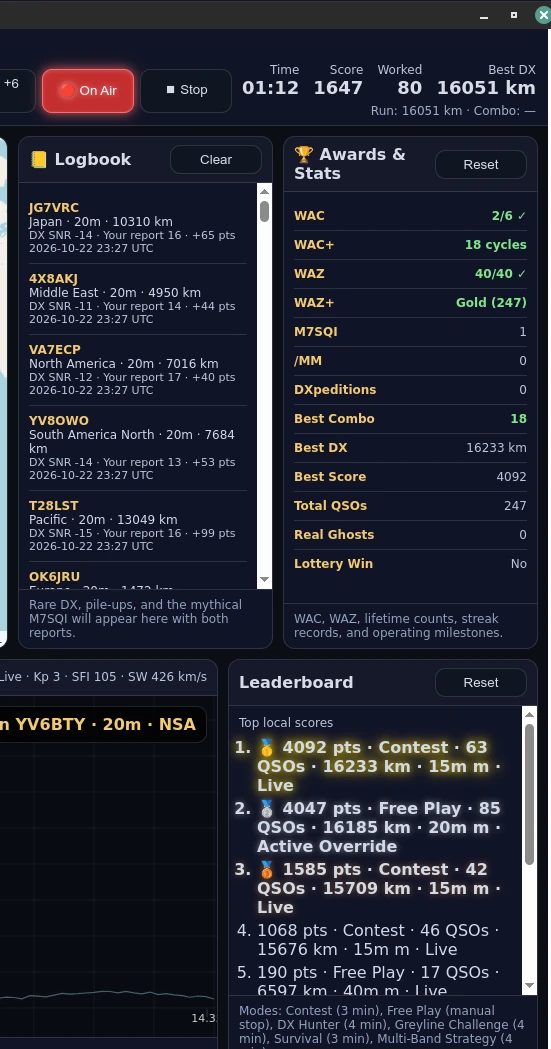
| Award/stat | How it works |
|---|---|
| WAC | Work all six represented continents. |
| WAC+ | Counts completed WAC cycles. |
| WAZ | Work all 40 represented CQ-style zones. |
| WAZ+ | After WAZ is complete: Bronze at 60 zone contacts, Silver at 80, Gold at 100. |
| DXpeditions | Lifetime count; milestone awards are tracked at 3 and 10. |
| /MM | Maritime-mobile count; milestones at 1, 3 and 5. |
| M7SQI | Ultra-rare special-event count; milestones at 1, 3 and 5. |
| Best Combo | Highest successful streak; milestones include 5 and 10. |
| Real Ghosts | Counts the rare ghost signals that turn out to be genuine. |
| Best DX / Best Score / Total QSOs | Persistent lifetime statistics. |
13. Sound and radio atmosphere
DX Hunter uses sound as atmosphere and feedback rather than as a requirement for play. You can play muted if preferred.
- SFX enables generated radio-style effects and feedback.
- Hiss adds continuous receiver-style background noise.
- Master volume in the standalone editions runs from −6 dB to +6 dB, with 0 dB as the default.
14. Playing on phones and tablets
DX Hunter is playable on phones, but it is intentionally information-dense. A map, logbook, awards, controls and panadapter cannot all be given desktop-sized breathing room on a small screen.
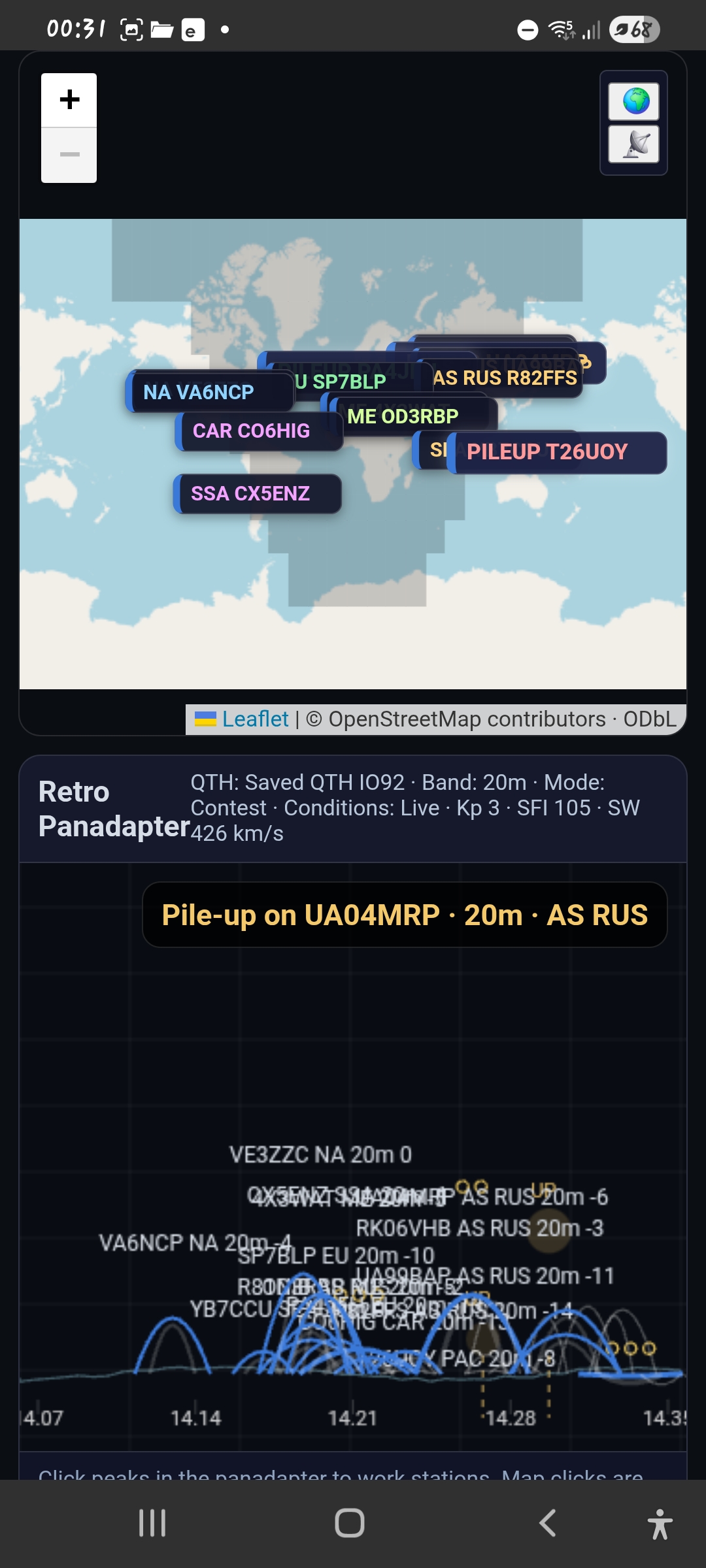
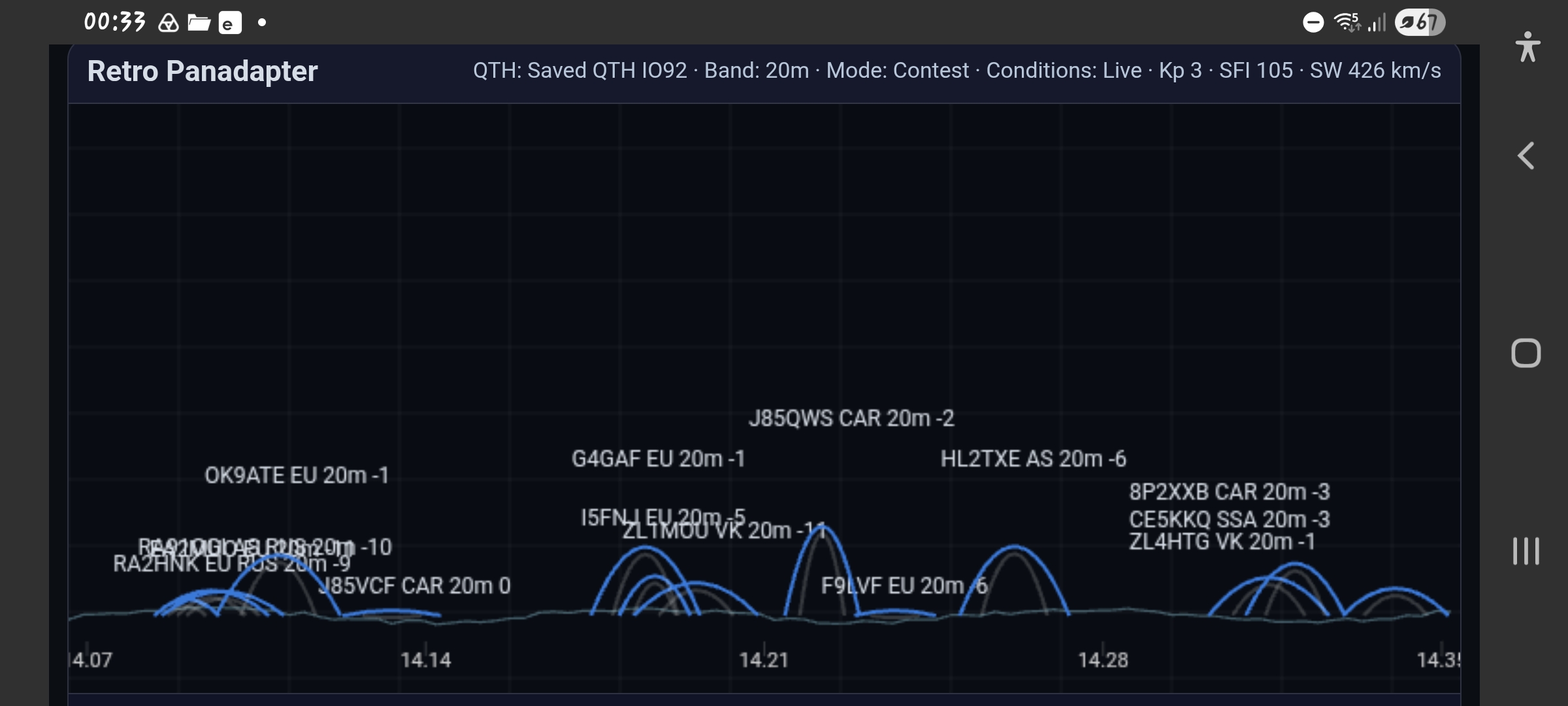
The layout may feel quite cramped on a phone screen, but it remains playable. On tablets, it should feel much more comfortable.
15. Internet connection and offline behaviour
The core game does not depend on an account or cloud save, but two visible features normally use the internet:
- OpenStreetMap tiles for map imagery.
- Live Conditions from the DX Hunter service at macalchemist.net.
If map tiles are unavailable, the game itself can still run. If live propagation data cannot be obtained, DX Hunter falls back rather than crashing.
16. Strategy: getting better scores without clicking everything
Read before clicking
Check band, callsign, SNR and special labels.
Weak can be valuable
Weak signals receive bonuses. Difficult long-haul catches can be worth a lot.
Protect the combo
Once you reach five consecutive catches, mistakes cost more than the immediate points.
Respect split
If the station is listening UP, operate where it is listening.
Do not force Greyline
Greyline Challenge is tied to real-ish dawn/dusk timing.
Use the conditions
High bands are more attractive in active/Solar Maximum conditions; 40m likes the dark side.
17. Troubleshooting
The map shows stations, but clicking them does nothing useful
Correct behaviour. Map markers are geographic context. Scroll to the panadapter and click the actual signal peak there.
Greyline Challenge seems almost empty
Check your QTH and local time. The mode deliberately becomes much more useful near your own dawn/dusk window.
10m feels dead
It can. 10m is intentionally feast-or-famine.
I click a pile-up but do not work it
Pile-ups require multiple successful clicks. If it is a split pile-up, make sure you are clicking the UP/listening area, not the DX peak.
I lost a lot of points with one click
Likely causes include wrong band, wrong region, false ghost or a panadapter miss.
The app looks crowded on my phone
The layout is dense by design. Scroll to the panadapter for actual play.
18. Short amateur-radio glossary
| Term | Meaning in DX Hunter |
|---|---|
| QTH | Your station location. |
| DX | Distant or otherwise desirable contact. |
| QSO | A completed contact. |
| Panadapter | Spectrum-style display showing signals across a frequency range. |
| SNR | Signal-to-noise ratio. |
| Pile-up | Many stations calling desirable DX at once. |
| Split / UP | The DX transmits on one frequency but listens higher. |
| Greyline | Dawn/dusk propagation along or near the day/night terminator. |
| DXpedition | An operation from a rarer or unusual location. |
| /MM | Maritime mobile: a station operating from a vessel at sea. |
| WAC | Worked All Continents. |
| WAZ | Worked All Zones. |
19. Frequently asked questions
Do I need an amateur-radio licence to play?
No. DX Hunter is a game. It does not transmit on the amateur bands and does not require radio equipment.
Is DX Hunter a real propagation predictor?
No. It uses real operating ideas and, in Live mode, current propagation/solar information, but deliberately reduces that into a simplified game model.
Do I need amateur-radio knowledge?
No. The basic game is click/tap based.
Does DX Hunter require an account?
No. There is no DX Hunter login or cloud profile.
Does it contain advertising or behavioural tracking?
No. DX Hunter does not include advertising, cross-site tracking or behavioural profiling.
Where is my game progress stored?
On your own device. Scores, logbook, awards, QTH and selected settings are local data.
Why is a real amateur-radio callsign appearing in the game?
Most callsigns in DX Hunter are generated randomly for gameplay. Because they are designed to resemble genuine amateur-radio callsigns, a generated callsign may occasionally match one that is currently or was formerly assigned to a real operator. This is coincidental and does not imply that the operator is associated with, has participated in, or endorses DX Hunter.
Genuine guest operators or contributed recordings will be clearly identified as authorised cameos.
Why is M7SQI so absurdly valuable?
Because every sensible game needs at least one thoroughly unreasonable special event.
Bug reports, feedback or propagation anomalies: DX-Hunter [at] macalchemist [dot] net
↑ Back to top